
Prepaid Balance
Prepaid Balance helps a group record shared-cost balances in one place. Members send money to the group owner outside PickleWallet, the owner confirms the record, and game costs can be deducted from each member's recorded balance.
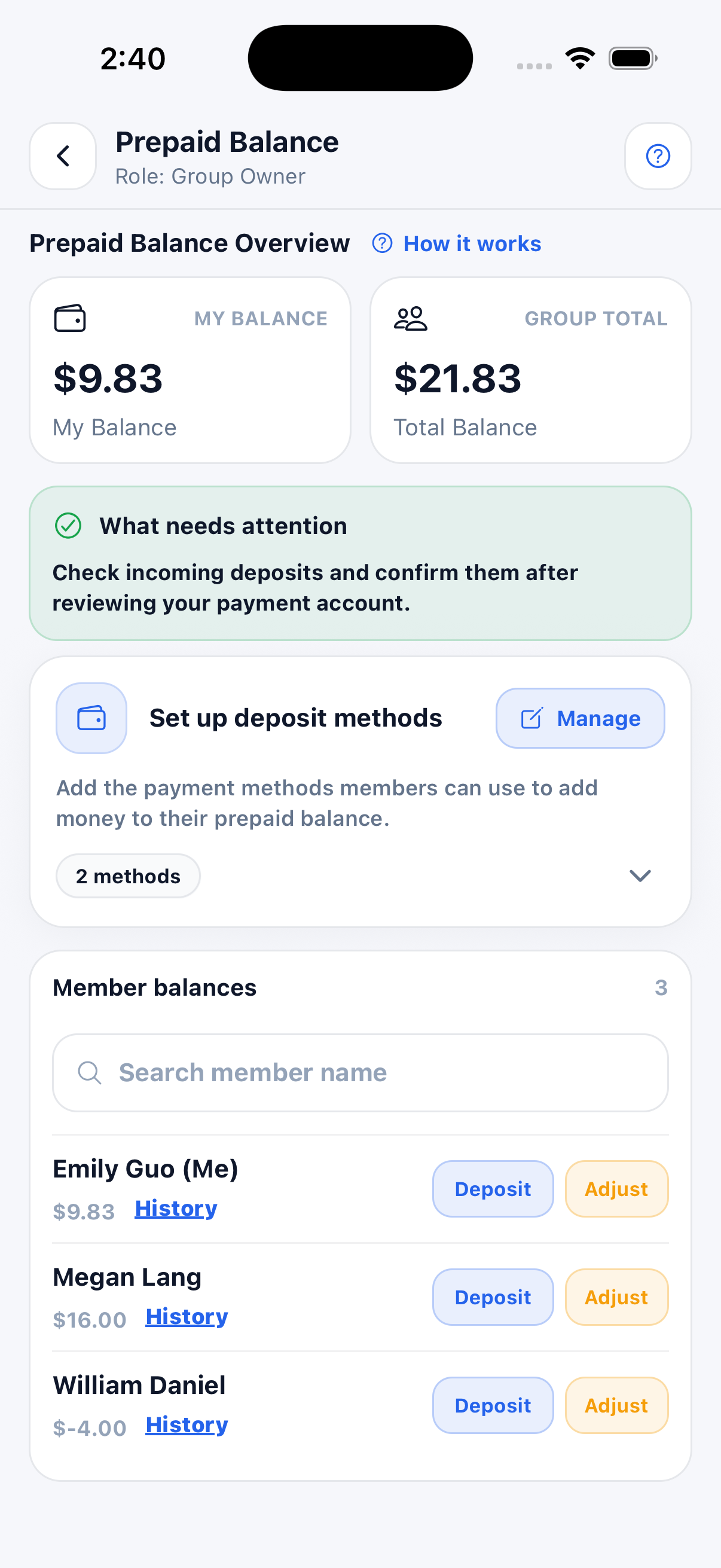
What Prepaid Balance is used for
Prepaid Balance is useful when your group wants to track money members have sent to the group owner for future shared game costs.
Track balances
Each member has a recorded Prepaid Balance, and the group can review the total of those records.
Add money
Members can send money outside the app, then record the deposit in PickleWallet.
Deduct game costs
After a game, shared costs can be deducted from player Prepaid Balance records.
Prepaid Balance for members
Members can view their own recorded balance, see the recorded group total, copy deposit methods, submit a deposit, and open their history.
- ✅ My Balance shows your recorded Prepaid Balance.
- ✅ Group Total shows the total of the group's recorded balances; PickleWallet does not hold these funds.
- ✅ Deposit methods shows how to send money to the group owner outside the app.
- ✅ Add money lets you enter an amount after sending money outside the app.
- ✅ History shows deposits, deductions, and adjustments.
Member balance list
Members can see balances and open history. Depending on your role, you may see different actions next to each member.
- 🔎 Search member name helps find a player quickly.
- 📘 History opens that member’s Prepaid Balance history.
- 💰 Balance shows the current recorded amount for each member.
Prepaid Balance for group owners
The Group Owner can manage deposit methods, check incoming deposits, view member balances, record deposits, and make balance adjustments. Co-helpers have view-only access to these records.
- ✅ Set up deposit methods tells members how to send money outside the app.
- ✅ Manage lets the owner update deposit methods.
- ✅ Deposit can record or help manage a member deposit.
- ✅ Adjust allows the Group Owner to correct or update a balance when needed.
- ✅ Member balances helps the owner see all recorded member balances.
Prepaid Balance history
Prepaid Balance history shows how a member’s recorded balance changed over time. You can review deposits, game deductions, and manual adjustments.
- 📥 Deposit adds a confirmed amount to the member’s recorded balance.
- 📤 Deduction subtracts money for shared game costs.
- 🛠️ Adjustment is used by the Group Owner to correct or update a balance.
- 📊 After balance shows the balance after each transaction.
- 🔎 Filters let you view all, deposit, deduction, or adjustment records.
Recommended Prepaid Balance flow
This is the normal flow when a group uses Prepaid balance.
Owner sets methods
The group owner adds deposit methods that members can use.
Members deposit
Members send money outside the app and submit a deposit request.
Owner confirms
The owner checks the payment account and confirms the deposit.
Game costs deduct
After games, shared costs can be deducted from player balances.
History updates
Deposits, deductions, and adjustments appear in account history.
Balances stay clear
Members and owners can see the latest recorded balances at any time.
Continue learning
Open another guide page to learn more about game costs and group management.