Group Dashboard
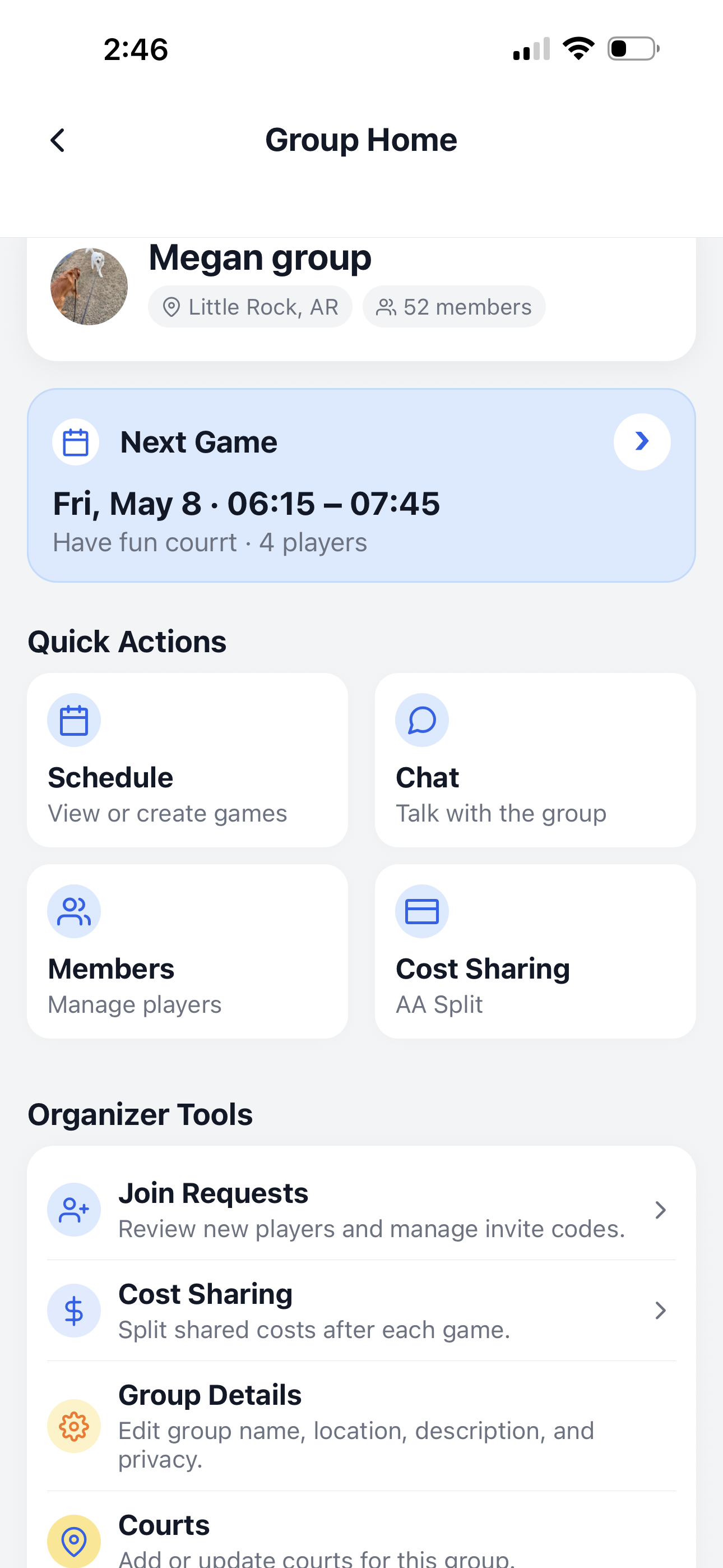
The Group Dashboard is the main control center for each pickleball group. From here, you can view the next game, open the schedule, chat with members, manage players, handle cost sharing, and update group settings.
What you can do from the dashboard
The dashboard gives members and organizers fast access to the most important group actions.
View next game
See the upcoming game time, court name, and current player count.
Open group chat
Chat with the group about games, courts, times, and updates.
Open cost sharing
Access Pay per game or Prepaid Balance depending on the group payment setting.
Quick Actions
Quick Actions are the buttons most members use every day. They help players find games, talk with the group, view members, and check payment actions.
- 📅 Schedule lets you view or create games.
- 💬 Chat lets members talk with the group.
- 👥 Members shows group players and member information.
- 💳 Cost Sharing opens Pay per game or Prepaid Balance.
Organizer Tools
Group owners and co-helpers can see extra tools for managing requests, group settings, courts, and payment setup.
- ✅ Join Requests lets organizers review new players and invite codes.
- ✅ Cost Sharing helps manage shared game costs.
- ✅ Group Details lets owners and co-helpers edit group name, location, description, and privacy.
- ✅ Courts lets owners and co-helpers add or update courts for the group.
Recommended setup flow
After creating a group, use this order to finish setting up the group.
Add courts
Add the courts or parks where your group usually plays.
Invite members
Share your group with players or approve join requests.
Create games
Use Schedule to create games and allow players to join.
Continue learning
Open another guide page to learn more about PickleWallet.