Create a Game
Create a new pickleball game by choosing the date, start time, end time, court, optional court number, and shared costs. Players can then join from the schedule or group dashboard.
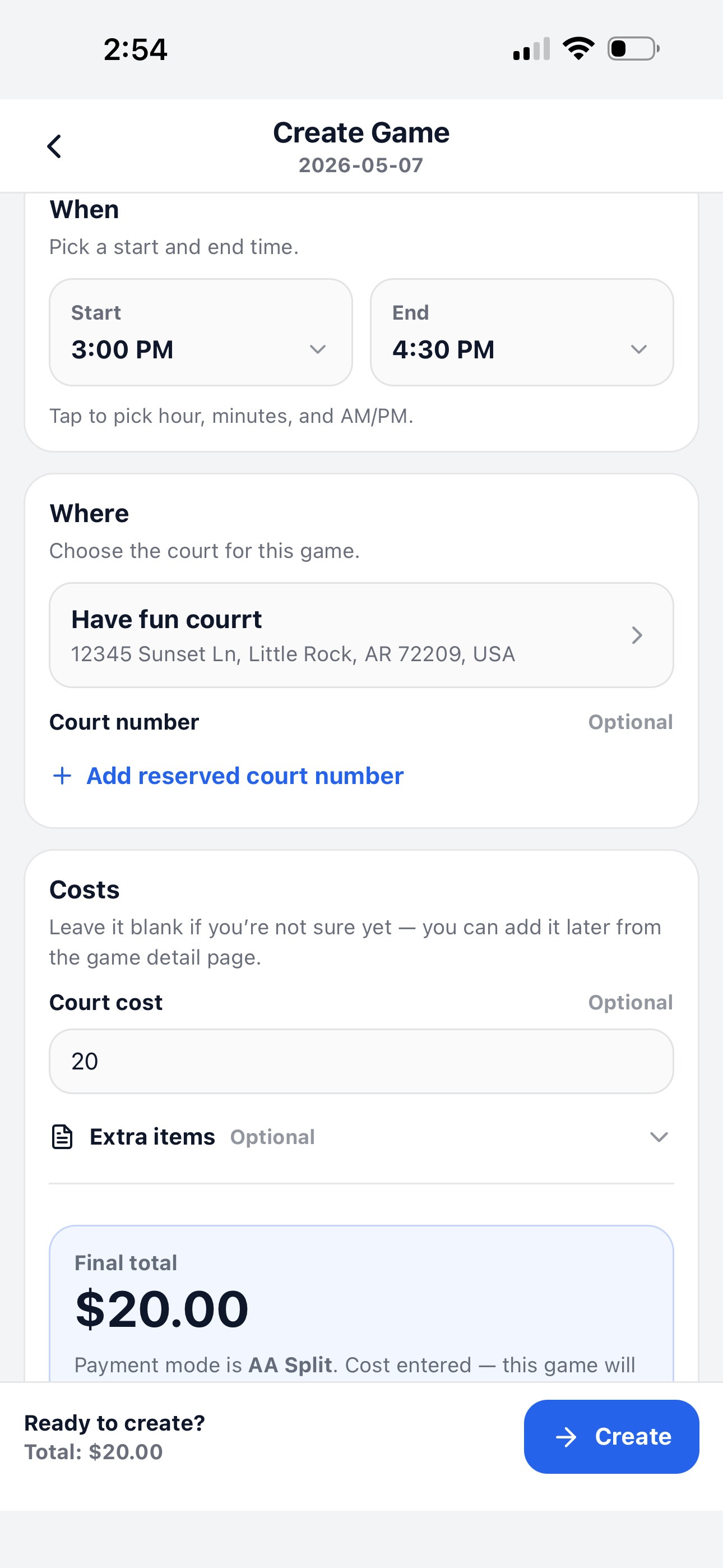
What you set when creating a game
The Create Game page keeps the most important details in one place so the game is ready for players to join.
Game time
Pick the start and end time for the game. Players will see the time on the schedule and game detail page.
Court location
Choose a saved court or park for this game. You can also add a reserved court number.
Shared cost
Enter court cost or extra items if the group uses Pay per game or Prepaid Balance.
Choose when and where
Start by choosing the game time and location. If your group already has courts saved, the primary court can be selected automatically.
- ✅ Start is when the game begins.
- ✅ End is when the game finishes.
- ✅ Where shows the court or park for this game.
- ✅ Court number is optional and useful for reserved courts.
Add costs if needed
If the game has a court fee or extra shared items, enter the cost before creating the game. You can leave it blank if you are not sure yet and update it later from the game detail page.
- 💵 Court cost is the main fee for the game.
- 🧾 Extra items can include balls, reservation fees, lights, or other shared expenses.
- 📊 Final total shows the total shared cost before you create the game.
- 💳 Payment mode follows the group setting, such as Pay per game or Prepaid Balance.
Continue learning
After creating a game, open the game detail page to manage players and costs.